¶ Pilots for Hire Job Board
If you are looking for Aeroconomy wiki articles, start here: Aeroconomy!
¶ About the "Pilots for Hire" (PFH)
You could think of "Pilots for Hire" as an “arcade mode” for Aeroconomy, where you can browse, filter, pick up ad-hoc jobs, and fly them for money.
The PFH jobs board does not require personal aircraft ownership or airline membership. It’s designed for contract or “stand-in” pilots to simply pick up a job or manifest and fly it using the aircraft provided by the customer.
They supply the aircraft, and you provide the skill to fly it!
These jobs are primarily aimed at helping new users start flying and earning money within the Aeroconomy world. They’re also a fantastic way to discover exciting new routes or enjoy random flights, all while earning virtual currency. That currency can later be used to buy personal aircraft, properties, or any of the many features coming to Aeroconomy.
Additional information about the initial release/launch annoucement can be found here on the original blog annoucement.
¶ Downloading the App
The download links below contain the "portable" application (no install required), simply extract the application and double click to run it!
Download links (v1.4.1)
- Windows (10/11) - .EXE - (69.6MB)
- Linux (Any) - AppImage x86 - (103.8MB)
- MacOS (Intel) - .ZIP - (99.3 MB)
- MacOS (Apple Silicon) - .ZIP - (94.1 MB)
If you are running Rosetta on an Apple Silicon Mac, you will need to use the Intel version otherwise you will get a "App is Damaged" error.
If you get "developer cannot be verified" error, you will need to go to the "Privacy & Security" settings of your Mac, scroll all the way down and select "Open Anyway" on the Aeroconomy app button that will be revealed.
¶ App Manual
While the app is pretty self explanatory, you can use these resources if you are stuck somewhere. You can always ask for help in the Aeroconomy forum-like channel on the FsHub Discord Server or use the links provided in the applications "Help" menu!
Use the sections on the navbar on the left of this page to navigate to various sections quickly and we'd highly recommend reading the "Useful tips" section below at the very least!
¶ Quick and useful tips
You must be enrolled into Aeroconomy in order for your flown jobs to be processed (and pay you for your flights). If you haven't done so already, this is a simple process that can be completed here in your FsHub's Settings > Aeroconomy page.
-
Ok, I've found a job that I like the sound of, know I have the aircraft required and I've "taken a job" (it's showing as under "Your Current Job" section within the PFH app - Now what?
Just like the simplicity that you're already used to (with FsHub), simply make sure that you have LRM running, you take off and land at the required airport (or seaplane base - those Alaska Fisheries jobs are fun!!) and you're using the correct aircraft. Once you land (in FsHub) it might take a few seconds but your flight will then be processed by Aeroconomy - As simple as that! -
The job that I have "taken" will expire before I can complete the flight! - What can I do about that?
As in the real-world, unfortunately a "contract" is a "contract", if you cannot complete the flight before the job is completed, we are taking a hard stance (at least for now) that you simply won't recieve anything for not having completed the job "on time". Click the "Release" button to remove the job and hopefully you can find another one that is equally as exciting to fly! -
After I complete (fly) a job the "Current job" section remains - Why is this?
Here are the most common reasons why a job might fail to complete:
- Departure airport incorrect: You must ensure you depart from the correct airport. If an incorrect nearby airport was detected, you can edit your flight on FsHub to correct it.
- Arrival airport incorrect: You must ensure you arrive at the correct airport. If an incorrect nearby airport was detected, you can edit your flight on FsHub to correct it.
- Time acceleration was used: Time acceleration cannot be used for PFH jobs.
- Aircraft incorrect: Aircraft requirements for PFH jobs is strict. For example, If a job requires that you fly an Airbus A320neo (A20N), you cannot use an Airbus A320 CEO (A320) instead. Likewise, the B772 is not the same as the B77L, and so on. However, if you're sure you flew the correct aircraft, you can submit an aircraft ICAO change request by editing your flight on FsHub. We'll review your request and, at our discretion, approve it in accordance with our regular FsHub aircraft designation requirements.
If your job failed to complete, use the "Debug" icon (in the top right corner) to see a list of the issues with your flight, then re-fly it in order to have it re-processed!
You can press the "Refresh" button at any time to re-load the application contents (including clearing a completed job).
- I successfully completed the flight but FsHub didn't detect the right departure or arrival airport - Do I have to re-fly the job?
Gosh, no! Simply "Edit" the flight report in FsHub and FsHub will then "pass the data" to Aeroconomy again where it will re-validate and process the flight. Note that this must be done before a job expires to get credit.
- I flew with a new aircraft (one that is not designated correctly) - What should I do?
As per the above, simply edit the Flight report, correctly designate the aircraft and then press "Save" - FsHub will "pass the data" to Aeroconomy again and it will be re-processed! Note that this must be done before a job expires to get credit.
- Where can I see my bank balance and check that I'm getting paid for the flights/jobs that I complete?
You can view your current bank balance and a list of all recent transactions from your Aeroconomy dashboard. Did you know - if you click the icon in the PFH app (the Aeroconomy Logo in the top left) it'll open your Aeroconomy dashboard, saving you some time!
- Why does my API Key not work when I try to login to the PFH app?
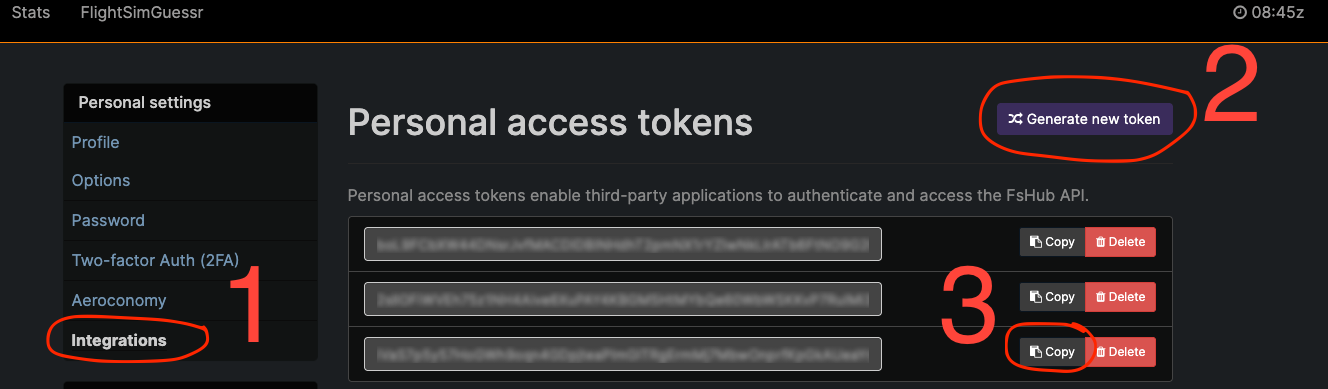
Only "new" API keys (after 28th of July) are "compatible" with Aeroconomy, simply visit your FsHub account's Settings page and create a new API key as shown below. Copy and use the new key to "login" to the Aeroconomy PFH app (you'll only need to do this the first time you open the app!) It can take a few minutes for the API token to "sync" from FsHub to Aeroconomy so just hold tight and try to login again after a few minutes (if you have issues)!
-
Does Aeroconomy work with Manual PIREPS?
Unfortunately not! We consider Aeroconomy (and all of it's features) as a global platform and as such in order to counteract "cheating", Aeroconomy Jobs are only processed if flown with our official ACARS software (LRM Client). -
The job filters don't appear to work / no jobs are showing when I add filter options - what gives?
The job filter fields are "inclusive" so whilst selecting multiple types of aircraft or customers will return jobs for any of the specified aircraft/customers, the other fields will essentially be an "AND" query instead of an "OR" query - You'll get the hang of it - Just have a little play around!
 -
When and how are jobs generated?
Each "customer" has a daily-changing number of maximum jobs that they can have "advertised" at any time, the Aeroconomy platform will frequently generate new jobs at varying pay levels based on numerous factors within the economy - Or to put it more simply... Check back regularly for new jobs, they have the ability to "spawn" frequently as long as other jobs (for that customer) are being flown/completed or nataurally expiring. -
Why do some jobs pay considerably more than others?
Well, partly due to "supply and demand" within the Aeroconomy platform but for PFH jobs specifically, these are normally due to specific customers/types of jobs. Your standard "Airline pilot" jobs won't always pay as much as maybe the Flying Doctors service - We specifically like this as this can incentivise GA pilots too! -
When will I be able to fly X aircraft and other types of jobs be available?
We're going to see how it goes over the next couple of days and assuming everything is running smoothly, various other types of themed jobs (long haul cargo, for example and maybe some commerical airlines in the US too as well as some more "cute" GA themed stuff) in other parts of the world and aircraft types will be added - Rest assured we're really excited to add more jobs and variation in aircraft types but for now, we are confident that the range of jobs, locations and aircraft will keep most of you happy! -
I want to fly jobs now to help my virtual airline of choice, later!
That's great news! If you have a virtual airline selected in the LRM app (when you fly any of these jobs), the virtual airline (assuming they are enrolled into Aeroconomy too) will automatically get 10% of your profits (and these figures are nicely shown in your Aeroconomy's bank transactions page too). You can however stockpile your hard-earned cash and complete a bank transfer to your VA at a later date too. -
What other benefits do Premium members get?
We really like to show our appreciation to our Premium members (as hey, you guys help us keep this platform running with your donations) and so, all jobs pay an extra 10% on top of the base pay (per job). This "bonus" is also shown and broken down within your Aeroconomy bank statements.